Analysis-Only
Analysis-Only is a leaner project mode: nori skips the wiki-building (indexing) phase and evaluates your compliance policy directly against your source code. There's no source-code Wiki tab or indexing step — but any external evidence you attach is still indexed and used. See Analysis-Only Mode for the details.
Pick this mode at project creation for smaller repositories, quick re-checks, or when you don't want to build or maintain a wiki index. The mode is fixed once the project is created.
Start a run
Open the project and, from the project header, click Run New Analysis. In the configuration modal that appears, you can customize the run options or select a different AI model just for this run (overriding the default project models).
Once started, nori dispatches a bounded sub-agent per control and evaluates your source code directly against the selected policy. Progress streams live as the run executes.

The project dashboard organizes everything into tabs: General, Controls, Evidence, and Configuration. (The source-code Wiki tab is hidden in this mode; the Wiki (Files) document index for evidence still applies.) Past runs are listed under Analysis History.
(Optional) Tune the analysis
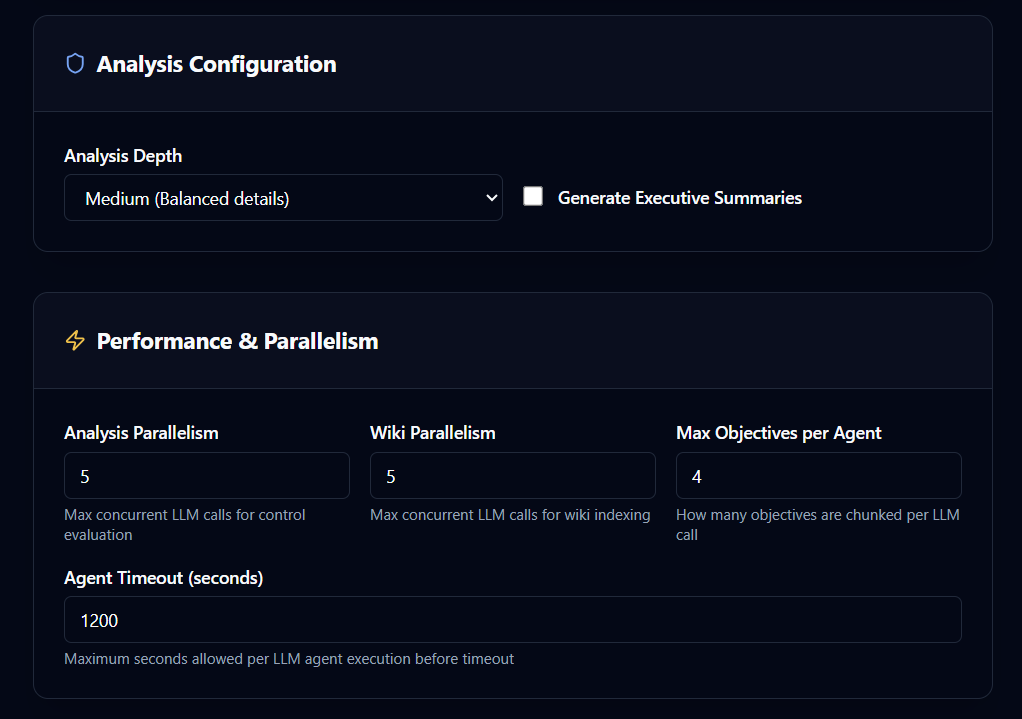
Adjust behaviour under Project Settings → AI & Analysis Config ("Adjust inference models and scanning logic"):
- Analysis Depth —
Light (Surface-level scan),Medium (Balanced details), orExtreme (Deep semantic traces). - Generate Executive Summaries — produce a high-level summary alongside the findings.
- Performance & Parallelism — Analysis Parallelism (max concurrent LLM calls for control evaluation), Max Objectives per Agent, and Agent Timeout (seconds).
- Budget Limits (Claude CLI) — Analysis Max Budget (USD) sets a per-agent spending cap; leave empty to disable it.
- Resumability — Skip Existing (Analysis) ("Resume runs by skipping already-evaluated controls").
Wiki-specific settings (wiki parallelism, wiki budget, concise wikis, and wiki compression) don't apply in this mode.
Add external evidence
Even without a source-code wiki, you can attach documents and index them for use during analysis — see External Evidence.
When your run finishes, continue to Review Results.